
So, I traded my younger brother's i3-4130 PC for a A10-7850K. You'll probably ask why, considering that with a GPU, that i3-4130 could beat the A10-7850K any day.
I asked that question myself, and my answer is: I don't have 150 dollars for a new GPU. Even second hand RX460s run near the $100 mark. The used-to-be-cheap GTX 1050ti is now going past $200. Thank you very much, cryptominers.
Anyway, the system in question as follows:

Look at that TDP.

I have the ram running XMP at 2133 through BIOS, dunno why it displays 1600 in Task Manager.
To crossfire your A10 with your R7, first you need to do the following:


Please do this to complete enabling Dual Graphics, I mean Hybrid Crossfire, Actually since
Radeon Software 18, Dual Graphics is referred to as plainly, Crossfire.
- Install your video card and install updated drivers. March 2018 has recently brought us Radeon Software Adrenalin Edition, something that differs from the old Catalyst that most Dual Graphics setup guides use.
- Restart your computer and enter uefi bios.
- Once inside the bios ( ͡° ͜ʖ ͡°), go to advance (I'm using a FM2A78M-HD2 here, which is in no way a gaming motherboard, so it uses a plain UEFI) NB configuration/settings.
- Go to primary GFX and set that to NB PCIe.
- Find IGFX and set that to force.
- Set an UMA buffer size that is similar to your R7-250's memory. I have a 2gb DDR3 model so I set it to 2gb.
- Save changes and exit bios.
This is the part where the old guides are rendered moot. It's 2018 and AMD has stopped referring to Dual Graphics as Dual Graphics, it is now plainly, Crossfire. But apparently Dual Graphics is still alive in their mobile graphics line.
Please do the following next:
- Open Radeon Settings.
- Go to gaming tab.
- Open global settings.
- If you see that AMD Crossfire is on then congratulations, you successfully enabled d
ual graphicsCrossfire between your iGPU and your dGPU. - Otherwise just slide it on. ¯\_(ツ)_/¯
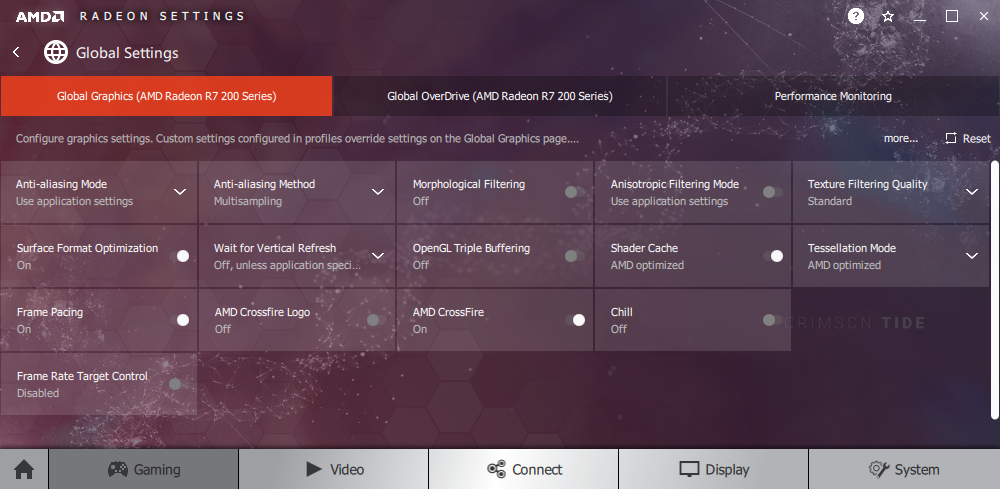
Had the AMD Crossfire Logo option on for a while. Didn't notice any logo during gaming.
Enjoy a small FPS increase when using a DDR3 R7, otherwise the gainz are better with the GDDR5 version.
To confirm if you really do have it in Crossfire, download GPU-Z and look at the Crossfire section.
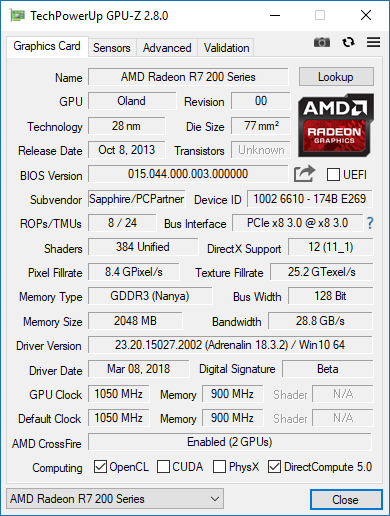
Can't really do benchmarks but by experience, you should be able to get 20-40 fps on 1080p medium settings on most E-Sports titles. Ran TERA Online (2011) on 5/6 graphic preset and shit looks surreal, though running only at a meager 22ish FPS.

Do elves really need to be this sexualized? Also why can't sorcerers have armor, even just light armor. I kinda feel bad for my character going to battle with something short of a nightgown.

I'm bringing sexy back, yeah.

Didn't let the game auto-detect performance at first, so I had this quality for a while, even with just iGPU.
Next game I tested is Company of Heroes 2 (2013). A.K.A Dawn of War 2 Ancient Tera Edition. With just the A10-7850K, it returned the following performance test values:


Looks pretty decent at low settings. Wonder how it looks like in ultra settings.
With A10-7850K and R7-250 crossfired:


Auto-detect settings.
Also, my Ryzen plans are shelved. Gonna work and game with this A10 for a while. Will eventually swap out the R7 for an RX-460 from my aborted Ryzen build soon.
Update:
So, I decided to transplant my A10 to a smaller case micro-ATX, Deepcool Smarter. It's a tad more compact than my Aerocool GT Black case. I also took the opportunity to replace the CPU cooler with an old NZXT X31 AIO.

Look at how dry that is. No wonder the CPU package temps breach the 100c mark.

Comfy. Hopefully with two intake fans, it should breathe just fine.
Here's COH2 running in my RX-460.


Check out that performance boost. Dual Graphics is so 2014. Get yourself
discrete graphics if you want to play recent titles for real.


