Okay. Lemme cry myself to sleep. It was almost 10 years worth of dev and cringe.
Thursday, June 28, 2018
RIP: Project Rothera Dev Blog
I made a bet once that if this blog surpasses my original dev blog, I'm gonna nuke the dev blog. Welp, it did. So I finally nuked the dev blog. Here are its stats.
Sunday, May 20, 2018
Building A Cheap 8-Core PC: 2009 Vintage Xeon Build "KANZASHI" Part 1
A light gaming and rendering build. Slapped in a Zotac 750ti as I save funds for a K4200 Quadro.
Processor: Intel Xeon X3460 2.8Ghz - $60 equivalent, from a certain buy and sell website
Graphics Card: Zotac GTX 750ti 2Gb GDDR5 - $100 equivalent, from old rig
Motherboard: Asus P7H55M-LX - Free, old board
Memory: 8gb (2x4) Samsung DDR3 1600mhz, -$40, down clocked to 1333mhz
Power Supply: Generic local 700w PSU, $10
SSD: ADATA SU800 180gb - $60
HDD: Seagate 500gb - $40
Fans: 2x Generic PWM 80mm fans, $4
Case: Ancient case from old pre-built computer. Spray painted it flat black.
No, I don't have videos. Just a series of pictures.
The Xeon X3460 in its LGA 1156 socket.
Deepcool Ice Edge Mini FS 2.0 95W TDP cooler. This is the reason why I can't overclock the X3460 to 4.0ghz. I don't have any headroom to OC, for now.
Testing the Xeon with even older hardware. Turns out that PSU was having power delivery issues. Good thing it worked for this round of testing. The card in the picture is a Sapphire 6570 4gb DDR3 since the Xeon X3460 doesn't have integrated graphics.
The fans are remarkably cheap, considering they're 4pin PWM. The only downside is they're loud AF.
The Xeon in it's new home. I should have used metallic black instead of flat black. It's really absorbing light. Also ketchup and mustard wires.
I like ducts ( ͡° ͜ʖ ͡°) too bad the duct blocks the 80mm fan attached to the side panel.
So naturally I had to remove the duct. Blue motherboard, blue cooler, blue fans. But the case doesn't have good cable management so there's wires strewn everywhere. I'll get braided extensions or a true-rated PSU with braided wires. Maybe a better case and cooler later. Kek are there blue SATA cables?
And it runs surprisingly cool considering how small the cooler is.
Benchmarks to follow in a separate blog post. Meanwhile, I'm still doing game dev in my 7850K APU. And that modern CPU runs really hot even with water cooling. Meanwhile is 2009 vintage processor runs 20 degrees cooler in idle and under load. Wew. Intel got their efficiency game on point.
Tuesday, May 1, 2018
Tera Online in 2018: How Does it Hold Up?
Before you talk to me about the new Godsfall update, let me talk to you about my 97 hours in the Lost Realm.
Honestly I don't know how to structure this blog post. So let's just answer a few questions instead.
Should you play for the graphics? 8/10 YES.
Should you play for the character/character creation? 7/10 YES.
Actually 5/10 because most of the fashion items are cash shop, and if they're available at auction, you'll probably need to farm a month of gold before you can buy them. Not to mention most of the cloth armor in game is kind of lewd and not really okay for a prude like me who prefers the costumes you'll usually get in Aura Kingdom.
Should you play for the gameplay? 7/10 YES. THIS GAME CAN MAKE YOU DESTROY YOUR PERIPHERALS WITH ALL THE KEYS YOU ARE PRESSING.
Is the community/player base still alive? 8/10 YES. There are still lots of active players and guilds online.
So overall, should you still play Tera Online in 2018? Yes, provided you have a PC that can play it in full, otherwise if you end up with quality like in the following capture, forget it.
Honestly I don't know how to structure this blog post. So let's just answer a few questions instead.
Should you play for the graphics? 8/10 YES.
Should you play for the character/character creation? 7/10 YES.
Should you play for fashion and vanity? 10/10 YES.
Elves really look good with braids though.
Should you play for the gameplay? 7/10 YES. THIS GAME CAN MAKE YOU DESTROY YOUR PERIPHERALS WITH ALL THE KEYS YOU ARE PRESSING.
Is the community/player base still alive? 8/10 YES. There are still lots of active players and guilds online.
So overall, should you still play Tera Online in 2018? Yes, provided you have a PC that can play it in full, otherwise if you end up with quality like in the following capture, forget it.
Tuesday, March 20, 2018
WTF? Setting up Dual Graphics or APU+GPU Crossfire in Radeon Adrenaline, 2018
Updated: Apparently if you fresh install Windows 10, it'll install Catalyst as some sort of a basic driver. You may use any of the older guides you can find if that is the case.
So, I traded my younger brother's i3-4130 PC for a A10-7850K. You'll probably ask why, considering that with a GPU, that i3-4130 could beat the A10-7850K any day.
I asked that question myself, and my answer is: I don't have 150 dollars for a new GPU. Even second hand RX460s run near the $100 mark. The used-to-be-cheap GTX 1050ti is now going past $200. Thank you very much, cryptominers.
Anyway, the system in question as follows:
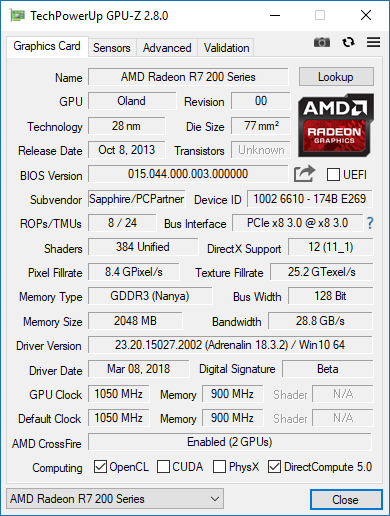
To confirm if you really do have it in Crossfire, download GPU-Z and look at the Crossfire section.
So, I traded my younger brother's i3-4130 PC for a A10-7850K. You'll probably ask why, considering that with a GPU, that i3-4130 could beat the A10-7850K any day.
I asked that question myself, and my answer is: I don't have 150 dollars for a new GPU. Even second hand RX460s run near the $100 mark. The used-to-be-cheap GTX 1050ti is now going past $200. Thank you very much, cryptominers.
Anyway, the system in question as follows:
Look at that TDP.
I have the ram running XMP at 2133 through BIOS, dunno why it displays 1600 in Task Manager.
To crossfire your A10 with your R7, first you need to do the following:
Please do this to complete enabling Dual Graphics, I mean Hybrid Crossfire, Actually since
Radeon Software 18, Dual Graphics is referred to as plainly, Crossfire.
- Install your video card and install updated drivers. March 2018 has recently brought us Radeon Software Adrenalin Edition, something that differs from the old Catalyst that most Dual Graphics setup guides use.
- Restart your computer and enter uefi bios.
- Once inside the bios ( ͡° ͜ʖ ͡°), go to advance (I'm using a FM2A78M-HD2 here, which is in no way a gaming motherboard, so it uses a plain UEFI) NB configuration/settings.
- Go to primary GFX and set that to NB PCIe.
- Find IGFX and set that to force.
- Set an UMA buffer size that is similar to your R7-250's memory. I have a 2gb DDR3 model so I set it to 2gb.
- Save changes and exit bios.
This is the part where the old guides are rendered moot. It's 2018 and AMD has stopped referring to Dual Graphics as Dual Graphics, it is now plainly, Crossfire. But apparently Dual Graphics is still alive in their mobile graphics line.
Please do the following next:
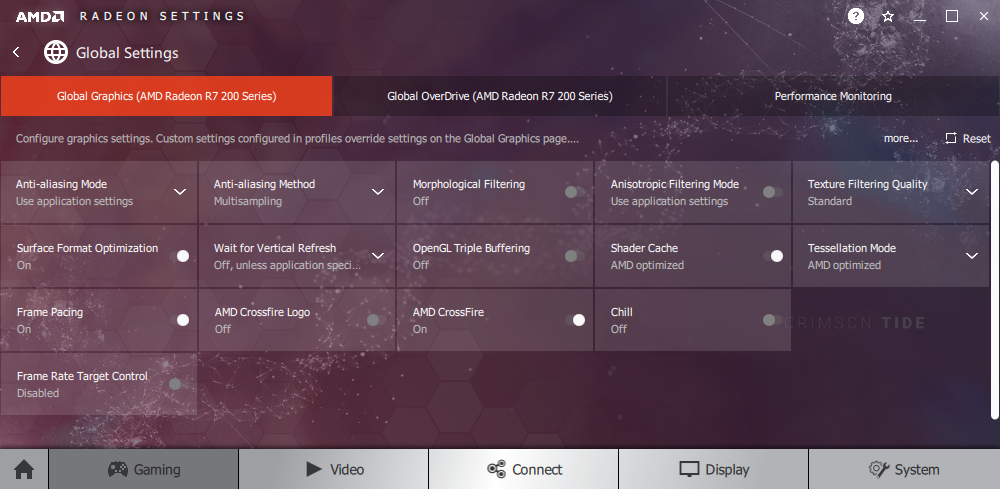
- Open Radeon Settings.
- Go to gaming tab.
- Open global settings.
- If you see that AMD Crossfire is on then congratulations, you successfully enabled d
ual graphicsCrossfire between your iGPU and your dGPU. - Otherwise just slide it on. ¯\_(ツ)_/¯
Had the AMD Crossfire Logo option on for a while. Didn't notice any logo during gaming.
Enjoy a small FPS increase when using a DDR3 R7, otherwise the gainz are better with the GDDR5 version.
To confirm if you really do have it in Crossfire, download GPU-Z and look at the Crossfire section.
Can't really do benchmarks but by experience, you should be able to get 20-40 fps on 1080p medium settings on most E-Sports titles. Ran TERA Online (2011) on 5/6 graphic preset and shit looks surreal, though running only at a meager 22ish FPS.
Do elves really need to be this sexualized? Also why can't sorcerers have armor, even just light armor. I kinda feel bad for my character going to battle with something short of a nightgown.
I'm bringing sexy back, yeah.
Didn't let the game auto-detect performance at first, so I had this quality for a while, even with just iGPU.
Next game I tested is Company of Heroes 2 (2013). A.K.A Dawn of War 2 Ancient Tera Edition. With just the A10-7850K, it returned the following performance test values:
Looks pretty decent at low settings. Wonder how it looks like in ultra settings.
With A10-7850K and R7-250 crossfired:
Auto-detect settings.
Also, my Ryzen plans are shelved. Gonna work and game with this A10 for a while. Will eventually swap out the R7 for an RX-460 from my aborted Ryzen build soon.
Update:
So, I decided to transplant my A10 to a smaller case micro-ATX, Deepcool Smarter. It's a tad more compact than my Aerocool GT Black case. I also took the opportunity to replace the CPU cooler with an old NZXT X31 AIO.
Look at how dry that is. No wonder the CPU package temps breach the 100c mark.
Comfy. Hopefully with two intake fans, it should breathe just fine.
Here's COH2 running in my RX-460.
Check out that performance boost. Dual Graphics is so 2014. Get yourself
discrete graphics if you want to play recent titles for real.
Subscribe to:
Posts (Atom)